Timeline
The Timeline is the primary work surface in Notaday. It shows active entries, supports quick capture, and helps users keep today's work in motion.
Core Capabilities
- Create tasks, routines, and journal entries from the command entry composer.
- Filter by type: All, Tasks, or Routines.
- Search entries by text.
- Filter by channel or tag from sidebar or entry metadata.
- Drag and drop entries to update manual sort order.
- Toggle completion state.
- Expand or collapse completed entries.
- Load additional entries through pagination.
- Edit, delete, connect, tag, or channel entries through the edit dialog.
Command Entry Composer
The New Note action opens a Spotlight-style command composer for fast capture from anywhere in the application.
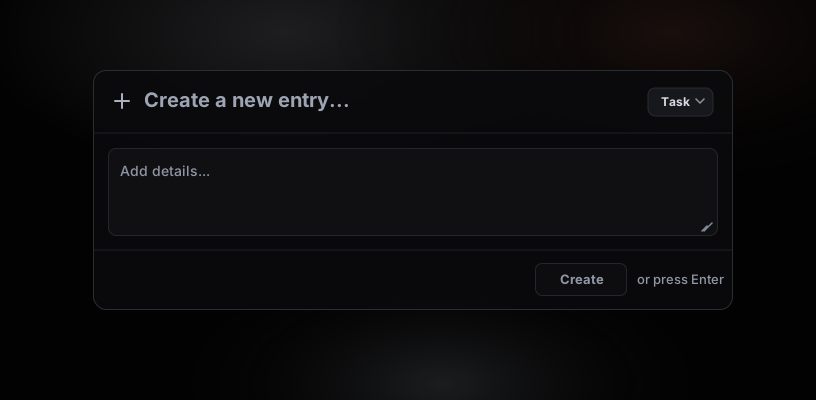
Users can:
- Open the composer with the New Note button in supported headers.
- Open the composer with the local keyboard shortcut.
- Enter a title and optional details.
- Create the entry with the Create button or by pressing Enter.
- Use the compact type dropdown on the right side of the input row to manually choose Task, Journal, or Routine.
The composer auto-detects the entry type while the user types. Manual selection overrides auto-detection for the current entry.
Keyboard Shortcuts
The new-entry shortcut is local to the browser and is selected automatically from the detected operating system on first launch.
Users can change or disable the shortcut from Settings.
Entry Type Detection
When a user types into the command composer or smart entry input, Notaday scores the text against simple keyword groups:
Explicit prefixes such as journal:, reflection:, routine:, and habit: also influence the detected type.
Routine Display Modes
Routine entries can be displayed in two ways:
The setting is controlled from Settings and persisted on the user profile.
Completed Entries
Completed entries are kept available in a collapsible section. If all visible entries are completed, the Timeline shows an all-caught-up state.